Showing posts with label Software. Show all posts

Friday, 13 November 2015

Argus Review

Hey Guys,

Today I've got another app review, but not for a game. Argus is a life-tracking app, that I mainly use for a pedometer, but can also be used to track things such as bike rides and other exercises. It puts all recent exercise into a cool looking hexagonal formation like so:


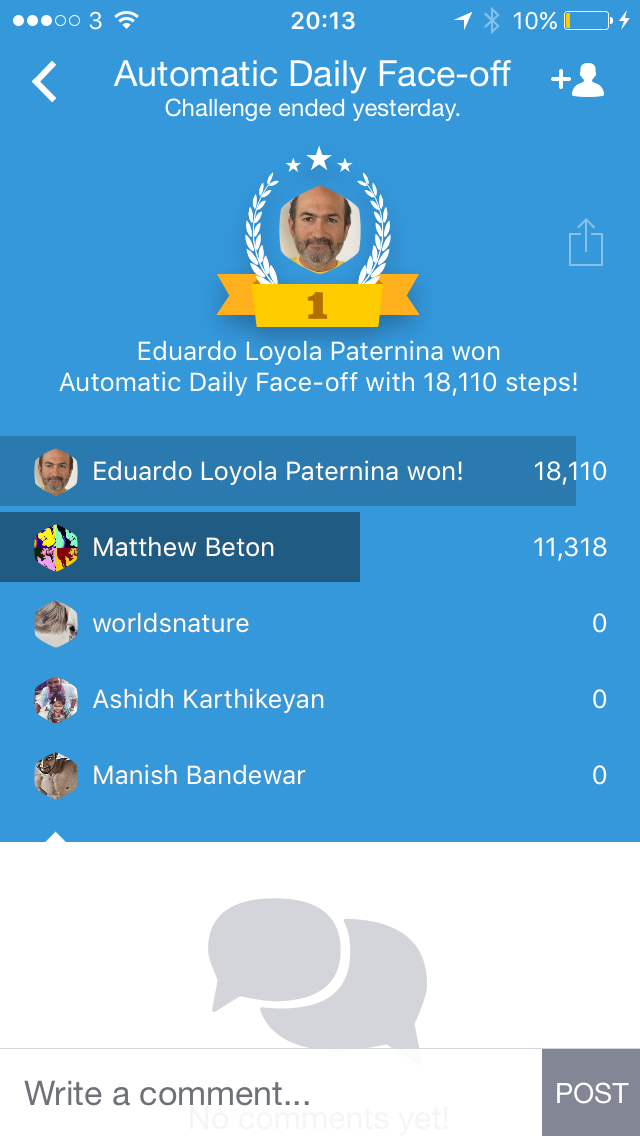
This formation is good looking, neat and easy to read. The items are a bit hard to determine what dey they are part of, as the dates are just another hexagon, but apart from that the view is excellent. The app automatically creates step battles against random people daily. One of the problems with this is that quite a lot of the people you can see here are inactive, with no steps for that day. This is probably because they have deleted the app and their account is still there.


One way to fix this problem would be to make it so that only people that had at least some steps the previous day get put in a face-off. One of the cool features of Argus is that it will recognise if you are doing a certain activity (eg. running) and start a running activity, gps tracking the run as well.

Thanks to the TWiT network (twit.tv) for recommending this app to me - I emailed a question in about what they would recommend as a pedometer app, and they mentioned this.

All in all, I would greatly recommend this to anyone that wants a pedometer app that will work well, have a social aspect and as well as being able to track a wide range of other activities.


Keep checking up here for the latest in geek!

Friday, 11 September 2015

Slack Review

Hey Guys,

So if you've read my IFTTT review, you will know that lately I have been testing a free online application called Slack. Slack is a messaging service intended to be used by companies and their teams, but can be used for other things. As an example, I am currently in 3 slack groups (or 'teams') - the Geek Circle, a group of my school friends, and a group for my family. The Geek Circle is currently just me and Theo (another blogger from this blog), but anyone can join if they want to (just email me at thegeekcircle@gmail.com ). My school friends use it to talk to each other (or at least I'm trying to get them to!), and my family uses it to plan events and other things.


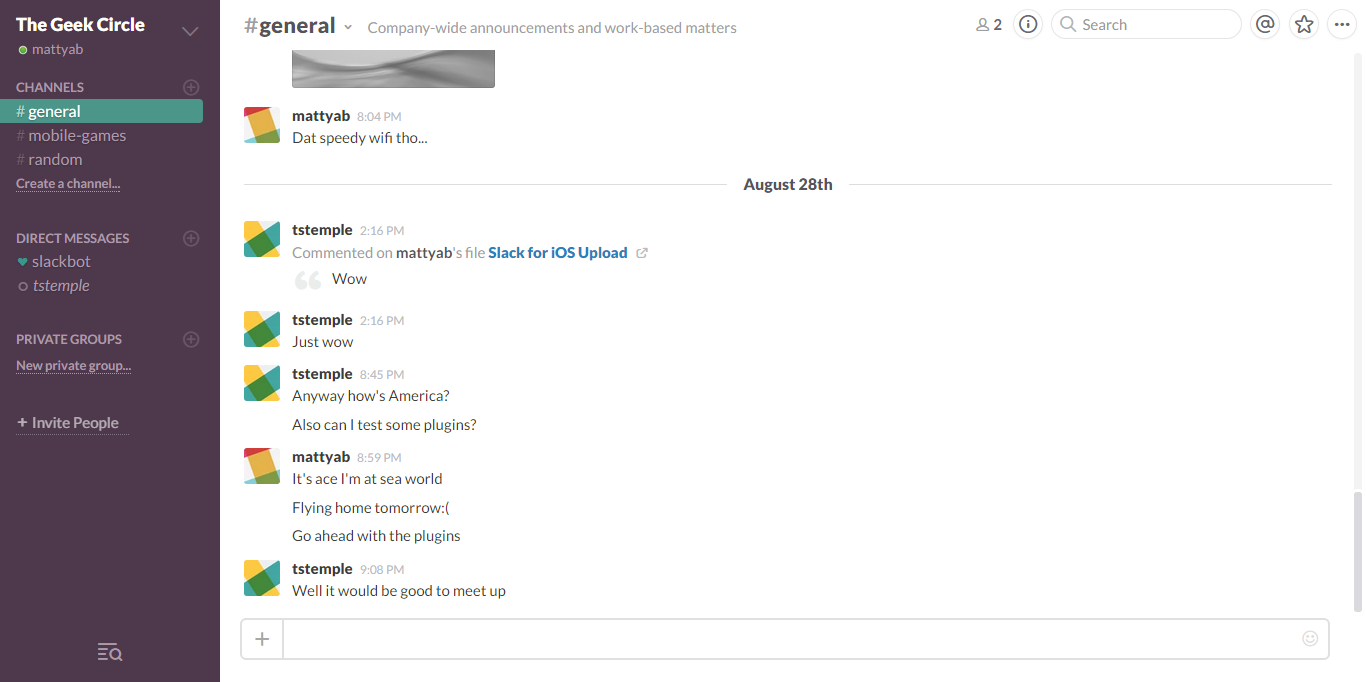
The interface, as you can see, is very good looking and polished, and it's easy to find your way around. This is a shot of the desktop app, that is also very similar to the web interface, but there's also an iOS and Android app.

One of the reasons people go for Slack is the integrations. You can integrate slack with many different programs and apps, such as Google Calander, IFTTT and many more (full list can be found here). Integrations allow you to make slack do more, and you can even write your own. I have IFTTT set up to automatically publish the weather daily, and Google Calendar gives me a daily roundup. 

All in all, I think that Slack is a better option of a messaging service, weather you want it for communication with your family, or managing your project at work. I would greatly recommend it to anyone.


Keep checking up here for the latest in geek!

Wednesday, 26 August 2015

IFTTT Review

Hey Guys,

So I'm sure a lot of you saw my test IFTTT post a few days ago, as I was trying out one of the functionalities of IFTTT. So - what is IFTTT? It stands for If This Then That. No, it doesn't have some sort of crazy hidden meaning - It is just an app and webpage where you build recipes for if a certain thing happens, do another certain thing.

You are able to connect certain channels to your IFTTT account, for things such as Twitter, Facebook, Dropbox etc. (For the full list check out this page) and then use these channels in your recipes. The recipe I was testing was this:


If it detects a new post on this very blog (yes, this one!) it posts a Buffer Tweet to @TheGeekCircle following the template shown on the second photo. Another one of my recipes is to post the weather of the next day to my family Slack. Slack is a collaboration/messaging service, and there should be a review of that coming out soon.


I would definitely recommend IFTTT to anyone, especially if they find themselves doing the same thing whenever a certain thing happens. It's free, so... Why not give it a go! You would be surprised at what it can do!

Keep checking up here for the latest in geek!

Sunday, 23 August 2015

Mazecraft Review

Hey Guys,

So today, I'm reviewing another free mobile app, but this one’s a bit different. Mazecraft is, as the name would suggest, a maze building game. You build mazes, share them, and play other people’s mazes. You can collect coins in people’s mazes, and these coins can be used to build other mazes. This aspect I like, as it makes sure that you play mazes as well as build them. However, this can also be a bit of a problem, as some people just created empty levels with paths to all the coins.


This is one of my mazes that I have made, with many aspects such as doors, saws and spikes. You can see the total cost of the maze in the top right corner. When people play your levels, they can tip it 1-5 coins. this determines the rating of the level, that can be seen by other players.

All in all, I think this game is excellent for anyone that likes puzzle games, as well as building.

Keep checking up here for the latest in geek!

Thursday, 20 August 2015

King of Thieves Review

Hey Guys,

Sorry that I haven't posted in a while, but I've been on holiday in California. I've been vlogging about it on my YouTube Channel, so make sure to check that out if you haven’t done so already. Today I’m going to be reviewing King of Thieves. King of Thieves (or KoT) is the mix of a platformer and a PvP multiplayer, free for Android or iOS. Below is a screenshot of my current base design.


You can see the 3 different traps of my base: the Red Guy, the Green Cannon and the Fly one. This is my defence: the way you protect your gold and gems. You can edit the layout of your base so that is more difficult for attackers to get your loot. You also have the statue (centre top with 3 gems and a progress bar). This is what attackers have to get to when attacking, and the dungeon door (below and to the right of the statue with the key holes). Before attacking, the attackers must use up their lock picks to open your door (a slowly regenerating nanocurrency). Only one of the locks is the correct one, so it is chance to how many lock picks it takes to break in.

Once you are in, you have to complete their dungeon. Your character moves when it can, but if it hits a wall it stops. The only way to change direction is to wall-jump, and while on a wall, you would slowly slide down it. You have to dodge the traps: the cannons shoot, the flies follow you and the red blobs fly repeatedly between two points.

Like most games in this style, there is a ‘supercurrency’ for players who pay extra to build up their character quickly. As well as this, there are two other currencies. Gold is the thing you use to upgrade your traps and other misc. items such as the speed your lock picks take to regenerate. Gems are the items that define your status. Every so often, you get a gem from a gem mine, and these gems have a value. When you collect the gems they go into storage, and you use these gems in rituals to combine them, making bigger gems. The risk of this, though, is that when you have a ritual ongoing, other players have a chance of stealing your gems after attacking you. Your personal overall gem value is the sum of every gem you have, defining your rank and status. Here is a photo of my current gem collection.


One of the very well-made parts of this game is the collaboration with other players. When a gem is stolen off you, you are able to try to retrieve it by attacking the player that stole the gem originally. If you fail, people in your alliance are able to also attack that person, giving you a higher chance that you will get your gem back. You also compete in wars, where you have a few day’s battle with another alliance, and the group that gains the most gems during that time wins some of the supercurrency.

All in all, I think that this game is excellent for anyone that wants a game they don’t want to be playing all the time, but can play occasionally. People that like platformers such as Mario and multiplayer games like Clash of Clans would enjoy this game.


Keep checking up here for the latest in geek!

Monday, 20 July 2015

iOS 9 Review

Hey Guys,

So recently the open beta of iOS 9 came out, and so I decided to give it a test. The installation process was not difficult - I just had to go to the webpage, and put my apple ID in. I then was able to download the 'profile' onto my device, enabling the option to update to the latest version of iOS 9.

The aim of iOS 9 is all about learning about you - what webpages and places you visit, what news and books you like to read etc. This ties in with the new Apple Music service, which learns the music you like and gives you new recommendations of what to listen to next.

There are also some graphical changes - the multitasking screen looks slightly different, as well as the siri graphic and a new default font. Here is images of some of he new graphical additions:


The news app was useful when it worked,  but it has stopped functioning and crashes every time I try to open it. I have submitted this as a bug report, along with other bugs I have found. There is a new "mode" to put your phone in - power saver mode. Power saver mode reduces power consumption until you fully charge your iPhone by turning of mail fetch, background app refresh and automatic downloads, and reducing some visual effects.

All in all, I think that iOS 9 is a good thing but only if you are prepared for the bugs and crashes. Due to this, I would only recommend it if you have a use for it for example to review it (like me!) or if you are a software developer.


Keep checking up here for the latest in geek!
Friday, 10 July 2015

DotVPN review

Hey Guys,

So I've recently been recommended a chrome plugin called DotVPN by Will Melbourne. It is a blocker for an array of things, such as ads, trackers and firewalls. I use this program for blocking the firewall at my school, as for example I wanted to use a bit of CSS from a page, but I couldn't get to the page as it was blocked. I wouldn't use this program all the time, as I have been told there are few servers, and with few servers dealing with all of the requests, the speed isn't brilliant. One of the features I like is the colourfulness of the icon and main page of it. It is a small touch, but very nice, and as a kid I think this is cool. I also find the movement of the graph in the icon satisfying, as if I'm physically doing something, and it's giving a live feed of my activity.

All in all, I think that DotVPN is a useful tool if you have a use for it, but I wouldn't just use it as an ad blocker. 


Keep checking here for the latest in geek!

Monday, 22 June 2015

Adobe Premiere Elements 13 v.s. Movie Maker

Hey Guys,

So if you are subscribed to me on YouTube (if not please feel free to do so here) you will know that my latest video was edited with Adobe Premiere Elements 13. This is not normal, as I usually use Movie Maker as it is the only editing software I had access to. This has now changed, as my Dad recently bought the Photoshop Elements 13 and Premiere Elements 13 Bundle, containing licences for two computers. The second license for both has been installed on my computer, so I now have free access to both pieces of software. This post is going to be a comparison between Adobe Premiere Elements 13 and Movie Maker.


Accessibility

So first thing first: Who can access them? Movie Maker is made my Microsoft, so is a Windows-only program. Premier, however, is for both PC and Mac users. Movie Maker is free, but Premiere is £40 (~$60) when bought alone, the bundle containing Premiere and Photoshop being £65 (~$100). This makes Movie Maker more accessible to most, and for Mac users the free option is iMovie. 

Features

Premiere has more features than Movie Maker, as you'd expect, but what are they? Premiere is much more detailed, with more options for colouring of the main screen e.g. hue, saturation, whereas Movie Maker just has pre-set filters. One of my favourite features of Premiere that Movie Maker doesn't have is the ability to have multiple pieces of content (video, photo etc.) on screen at once. This would be needed if you were using a facecam or something like it, as you would need to be able to put your second piece of footage on screen as well as your first piece.

Usability

As you would expect, Movie maker is easier to use as it is available to anyone and needs to be user friendly. Premiere is a bit more difficult to navigate, but once you've got the hang of it, you can easily navigate it's menus. Premiere does run quite a bit slower than Movie Maker, but that is to be expected as it has more features to be running. 

The Verdict

So all in all, I think that Premiere is for people that are more professional that Movie Maker users as it costs. Movie Maker is good for amateur people, as it is free so easily accessible. Premiere Elements also would not be for complete professionals editing videos daily, as for that you would want the more advanced Premiere Pro


Make sure to keep checking here to see the latest geek news!

Saturday, 13 June 2015

Google Photos Review

Hey Guys,

So recently I was told about one of Google's services: Google Photos (find them here). Google Photos is an UNLIMITED photo storage service based in your web browser (yes, I said unlimited). You upload all of your photos in bulk, and it sorts them out into location, date, 'things' (such as planes, food etc.) and if you're in America, then people (you can't get this feature in the UK). It does this with the content of the pictures (key features etc.) and the metadata of the image (date taken, geotags if taken on a phone etc.) This is useful as it doesn't matter how well sorted your photos are currently, Google Photos just sorts them into easy to view set of categories.

Google Photos also has a feature called 'Assistant'. This is a auto photo editing feature, that creates collages, animations, panoramas and filters for photos. It is a nice feature, adding some good looking photos to your collection. This, as I said, is a nice feature, but I don't think it's necessary - Just a solution looking for a problem. Here are some examples of things Assistant has made:

Collage of similar pictures of me.


Animation of similar pictures of my room.


A panorama of 2 photos of paintings of New York


The Google Photos interface is well designed, looks good, and is easy to navigate: 


As well as having a mobile app with auto backup from my phone to Google Photos:


All in all, I think that Google photos is excellent with as many photos as you like - whether it's me with 300 photos, or my Dad with 56,000 photos, I would highly recommend this service.


Make sure to keep checking here to see the latest geek news!

Wednesday, 3 June 2015

Buffer Review

Hey Guys,

So I found out about a cool web-based program called Buffer (Find it here). It is used to schedule social media posts and spread them out. It works on the principle that you have a schedule, for me it is to tweet 4 times a day (at set times), and when you write a post in buffer, it goes into your queue. Your queue is your list of outgoing posts, so when one of your set times arrives, the post at the top of your queue gets tweeted. This is useful as it spreads out your posts so that they aren't all clumped together.

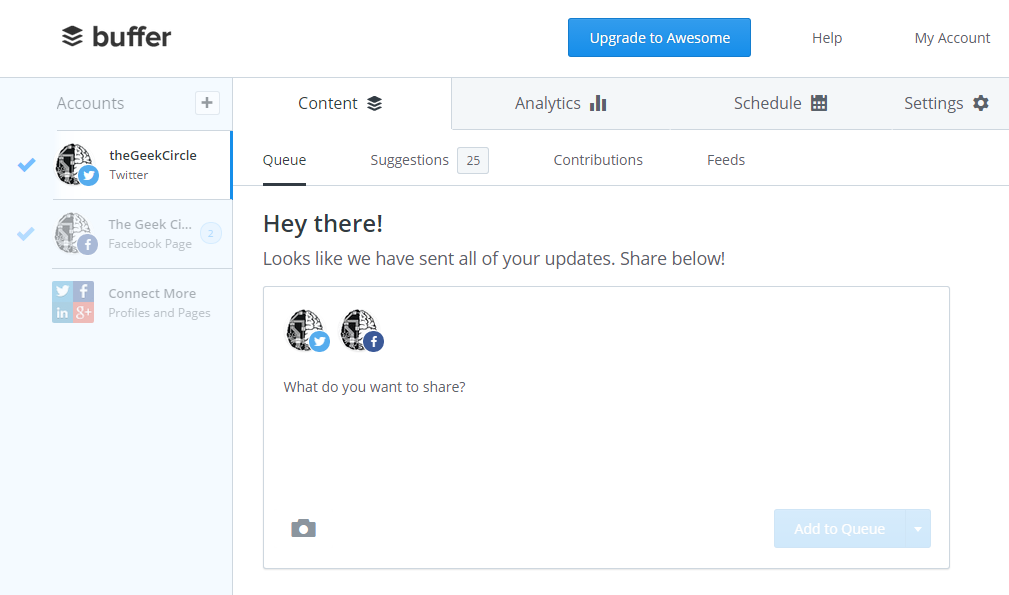
The interface is very nice and well polished, as can be seen in this picture:

There is also a chrome extension that opens up a posting window for ease of posting without having to open the web page. Here is a screenshot of it: 
And finally, the mobile app. This allows you to post via buffer using your iOS or Android device. Again, this app is very polished and nice to use. Here is a shot of it: 

In conclusion, Buffer is a great program and very easy to use, but only use it if you have a reason - If you do then great! Definitely use it, and if you don't, then you can still use it, but you may not be able to use it's full capabilities. 

Make sure to keep checking here to see the latest geek news!

Wednesday, 1 April 2015

GitHub V.S. BitBucket

Hey Guys!

Today, I'm going to be doing a comparison of the two big online source control tools: GitHub and Bitbucket. GitHub, I think, is more popular but Bitbucket is very well made.

Compatibility


Bitbucket can be used with Git and Mercurial, two big low-level source control programs, yet GitHub can only be used with git. This would be a problem if, for example, your code writing tool does not have a git plugin, but you wanted to use GitHub, you couldn't - you would need to use something else.

Client-Side Programs


Both GitHub and Bitbucket have client-side programs. GitHub uses the official GitHub program, and Bitbucket uses SourceTree. GitHub's program is easy to use and looks better, whereas Bitbucket's is harder to use and doesn't look as good.

Bug reporting


All programs have bugs, right? You need a good way to have users to report them. Bitbucket has this ability, but GitHub does not, unless the owners of the repository implement it themselves. GitHub can have bugs reported by the repository owners, but there's no way the contributors could find every bug in their program.

Conclusion

All in all, I think that Bitbucket is better, as it is more compatible, and the bug reporting system is much better.


GitHub: https://github.com/
Bitbucket: https://bitbucket.org/


Make sure to keep checking here to see the latest tech news!

Monday, 30 March 2015

Move Or Die Review

Hey Guys,

A few days ago, I bought a game called Move or Die on steam. I have been following this game for a while lately, but have finally decided to buy the full game, as I couldn't wait for it to come out of early access. The game is made by Those Awesome Guys (or TAG).

It is a 2D arcade-style game, built on the principal that if you don't move, you die. The game is very fast paced, and very fun to play. There are game modes, the newest being Sugar Rush; a race to get the candy first, ranging to Stomp, having to stamp on others.

Modding

You are encourage to modify the game, after all, it's initials are MoD! I made some changes to the speed of characters to make the AI bots really bad, as they are not programmed that way and otherwise are really hard to beat. I also changed some of the textures of the characters, making them look  different.

Move or Die uses Bit Bucket to host it's game (although the repository is private) so bug reporting is an easy process. I have reported a couple of bugs already, as it is in early access. Me and my friends have had a great time battling to be the best at Move or Die, and I hope you will too! I highly recommend this game to all ages.

Move or Die website:  moveordiegame.com

Picture from MoD's Steam site

Make sure to keep checking here to see the latest tech news!