Monday, 22 June 2015

Adobe Premiere Elements 13 v.s. Movie Maker

Hey Guys,

So if you are subscribed to me on YouTube (if not please feel free to do so here) you will know that my latest video was edited with Adobe Premiere Elements 13. This is not normal, as I usually use Movie Maker as it is the only editing software I had access to. This has now changed, as my Dad recently bought the Photoshop Elements 13 and Premiere Elements 13 Bundle, containing licences for two computers. The second license for both has been installed on my computer, so I now have free access to both pieces of software. This post is going to be a comparison between Adobe Premiere Elements 13 and Movie Maker.


Accessibility

So first thing first: Who can access them? Movie Maker is made my Microsoft, so is a Windows-only program. Premier, however, is for both PC and Mac users. Movie Maker is free, but Premiere is £40 (~$60) when bought alone, the bundle containing Premiere and Photoshop being £65 (~$100). This makes Movie Maker more accessible to most, and for Mac users the free option is iMovie. 

Features

Premiere has more features than Movie Maker, as you'd expect, but what are they? Premiere is much more detailed, with more options for colouring of the main screen e.g. hue, saturation, whereas Movie Maker just has pre-set filters. One of my favourite features of Premiere that Movie Maker doesn't have is the ability to have multiple pieces of content (video, photo etc.) on screen at once. This would be needed if you were using a facecam or something like it, as you would need to be able to put your second piece of footage on screen as well as your first piece.

Usability

As you would expect, Movie maker is easier to use as it is available to anyone and needs to be user friendly. Premiere is a bit more difficult to navigate, but once you've got the hang of it, you can easily navigate it's menus. Premiere does run quite a bit slower than Movie Maker, but that is to be expected as it has more features to be running. 

The Verdict

So all in all, I think that Premiere is for people that are more professional that Movie Maker users as it costs. Movie Maker is good for amateur people, as it is free so easily accessible. Premiere Elements also would not be for complete professionals editing videos daily, as for that you would want the more advanced Premiere Pro


Make sure to keep checking here to see the latest geek news!

Saturday, 20 June 2015

How a cube works

Hey Guys,

So today I'm going to be doing a less review - like, more mechanical post. In this post I'm going to be explaining how a cube works. All of the pictures in this post will be of a DaYan ZhanChi cube. My review of this cube can be found here and the ZhanChi can be bought here. So as we all know, A cube has six faces, with nine different "cubies" on each face. There are three different types of piece - a corner, edge and centre cap. The centre caps never move as it is an odd numbered cube, they can only rotate. This can be seen here:

The beige bit can never be seen, but the caps are visible. You can pop of the front of the caps to change the tensions on the springs in the core if your cube is too loose or too tight. Here is a picture of the pieces of a cube:


You can see the two types of pieces that you can get on the top - the three-coloured corner piece and the two-coloured edge piece. Both pieces are made of three parts, but in some cubes the edge piece only consists of two parts. The second row of pieces makes up the edge piece, the two outer pieces enclosing the middle 'torpedo' piece. This torpedo is not in all cubes and is not necessary at all, but is used to prevent pops. The bottom row of three pieces creates the corner piece. You can see how the cube goes together in the next picture: 


In the left section, you can see how the edge pieces fit into the core, with the torpedoes in the gap between the parts of the core. In the right-hand section, you can see how the edge pieces attach to the corners, with the torpedoes holding the edges in place. I hope that this post has better helped you understand how a cube works, and expanded your cubing knowledge.


Make sure to keep checking here to see the latest geek news!

Super Hexagon on offer!

Hey Everyone,

So this is just a quick post to let you all know that Super Hexagon is on offer at the moment on steam: it used to be £1.99 ($3.16) and it now only costs £0.67 ($1.07) If you haven't already, feel free to check out my review of Super Hexagon. The offer ends on the 22nd of June, so you'd better be quick!


Make sure to keep checking here to see the latest geek news!

Tuesday, 16 June 2015

War Thunder Review

Hey Guys,

So today I'm going to be doing another game review, and today I'm going to be checking out War Thunder (Can be found here). War Thunder is a free-to-play World War 2 third-person fighter. You get a mission objective, such as to destroy all ground units. You are in teams of about 12 people, battling the other side. Here is a picture of the gameplay: 


You can see the names of all of the other players, blue being friendly, red being hostile. The map is at the top right, your stats such as speed and throttle at the top left. Once you complete that game, you get a report like this: 


It tells you what you destroyed, how long the battle was and what rewards you got. You can then use these rewards to research and buy new aircraft. My problem with the game is that there is nothing to do, and I get bored after a few games. Unlike Minecraft or Terraria, you don't have any free building abilities, it's just a war game.

All in all, I think this is a good game for people that like war games or aircraft, but not for me as I am more of the creative type.


Make sure to keep checking here to see the latest geek news!

Monday, 15 June 2015

PC Specialist Review

Hey Guys,

Today I’m going to be reviewing PC specialist. PC SPECIALIST is a website that allows a custom build without the hassle and as cheap as possible. Their website can be found here.

From gaming to editing from work to holiday from small money to huge money, they will make any kind of computer/laptop for you.I have ordered myself a ‘mini PC’ from PC specialist for mild gaming and office work and possibly a bot setup if I get a new PC in years to come. My experiences with this company were great and their PC customization software was easy to use and had many options. I am looking forward to getting this computer because I will be able to access more programming languages as it will be much better than my old laptop.

Below will be the specs for my PC


Make sure to keep checking here to see the latest geek news!


I also have bought a wonderfully cheap mini PC with these specs;
Processor (CPU)
Intel® Pentium® Dual-Core G3260T (2.9GHz, 3MB Cache) + HD Graphics Card
Case
Inwin Mini-ITX BQ660 Case + 120W PSU
Motherboard
ASUS® H97I-PLUS: Mini-ITX, LG1150, USB 3.0, SATA 6GBs
Memory (RAM)
16GB KINGSTON DUAL-DDR3 1600MHz (2 x 8GB)
Graphics Card
INTEL® HD GRAPHICS MEDIA ACCELERATOR 4000
1st Hard Disk
500GB SERIAL ATA II 2.5" HARD DRIVE WITH 8MB CACHE (5,400rpm)
Processor Cooling
INTEL STANDARD CPU COOLER
Sound Card
ONBOARD 6 CHANNEL (5.1) HIGH DEF AUDIO (AS STANDARD)
Wireless/Wired Networking
WIRELESS-N (150Mbps) 3dBi HIGH GAIN USB ADAPTER
USB Options
2 x USB 3.0 PORTS + 4 x USB 2.0 PORTS AS STANDARD
Operating System
Genuine Windows 8.1 64 Bit - inc DVD & Licence (£79)
Windows 10 Upgrade
FREE Upgrade to Windows 10 with all Windows 7 & Windows 8.1 Purchases*
Office Software
FREE 30 Day Trial of Microsoft® Office® 365
Anti-Virus
BULLGUARD INTERNET SECURITY - FREE 90 DAY TRIAL

New Blogger!

Hey Guys,

So this is just a short post to let everyone know that there is going to be a new author on this blog. Theo Templeton is definitely a geek, so perfect for the job. His first post is going to be a review of PC Specialist (can be found here), a custom PC builder, as Theo has bought a "Mini PC" from them. This does not mean that I am going to stop posting, but Theo is going to be posting as well.

Finally, I just want to say a big thanks for 1000 views on this blog, which we hit a few days ago.


Make sure to keep checking here to see the latest geek news!

Sunday, 14 June 2015

Game of War: Fire Age Review

Hey Guys,

So today I've got another game review, but today it's a bit different. Today I'm going to be reviewing Game of War: Fire Age - a free (with in-app purchases) mobile game available on Android, iOS and Amazon (Kindle Fire). It is a MMO quite similar to Clash of Clans, but it is much more complex with much more strategy involved. It has many more features, and is built around the idea of alliances, even more though than Clash of Clans. 

Your "Base" is unlike Clash of Clans, as it is not one flat area with free movement of the buildings to no cost, but you have many set spaces for buildings (all the same size) and you have to pay in-game money to move them. You have buildings for troop training, silver production, hospitals, forges etc. inside your walls. This is what my base looks like at the moment:


You also need a way to generate resources, and this is why you have a section outside of the walls of your village for your wood, food, stone and ore production. 


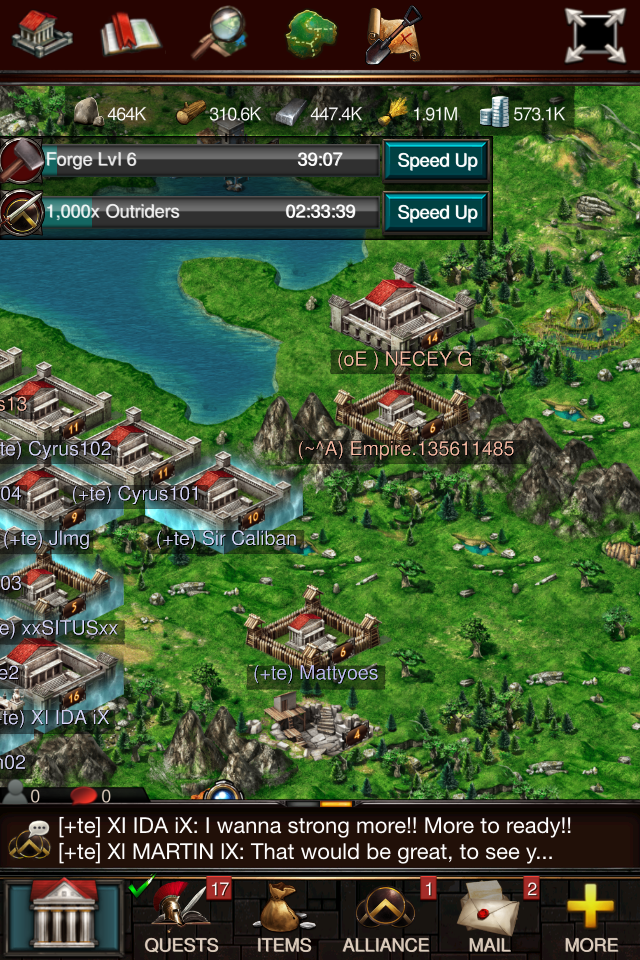
The last main view is of the world map. This is where you can see other players' empires, dungeons and resource tiles. This is also where the battle aspect of the game comes in. You can attack all of the things I mentioned previously, as well as compete in wars with your alliance and trade resources.


All in all, I think this is an excellent game for people like me, who enjoy games such as Clash of Clans but want a bit more strategy and thinking involved. The only problems with the game that I have found is that it runs very slowly on my phone (iPhone 4S) but is fine on my computer. It is also constantly putting ads for gold etc. in front of you, such as every time the game launches. Other than that, I would highly recommend this game to you.


Make sure to keep checking here to see the latest geek news!